Business Process Automation

Process automation for status tracking and exception handling

Build process automation around visibility into stages, waiting times and exceptions. We connect status and timing information so your team can find the delay, act on stuck work and choose which manual steps to automate next.

Conceptual process illustration for Process Automation
  • Live status on every in-flight item
  • Exceptions surfaced, not buried
  • Throughput visible by stage

The starting point

When delays become visible only after a deadline

We know the process is slow. We cannot say which step is slow.

Nothing records when an item enters and leaves each stage, so the delay is an impression rather than a measurement.

Problems surface when the customer complains.

Exceptions sit in the same queue as everything else, so nothing distinguishes a stuck item from a normal one.

What the work includes

Track each stage and the work waiting within it

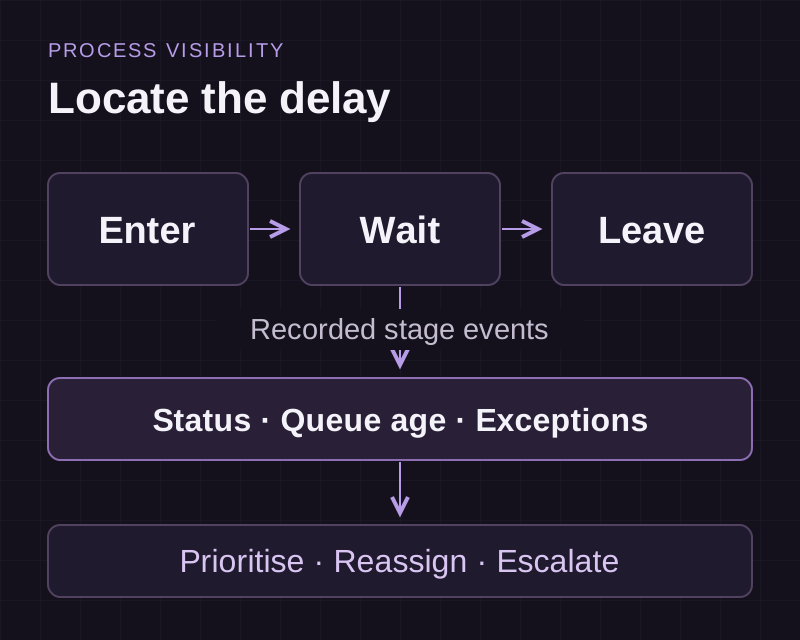
We define the process stages and capture the events that show an item entering and leaving each one. Dashboards bring queue age, throughput and exceptions into view. Your team can then prioritise, reassign or escalate work with a clear record of its status.

Explore the delivery process
Stage instrumentation

Every item timestamped as it enters and leaves each stage, which is what turns a vague slowness into a measured bottleneck.

Real-time status dashboard

What is in flight, at which stage, and how long it has been there. Visible to the floor and the office at once.

Exception rules and alerts

Thresholds that raise a case for human attention when an item stalls, breaches a promise date or fails a check.

Throughput and ageing views

How many items cleared each stage, and what the oldest item in each queue is. The ageing view is usually the one that changes behaviour.

Control actions from the dashboard

Reprioritise, reassign or escalate an item from where you can see it, rather than in a separate system.

Record enough to locate the delay

Capture when work enters a stage, when it leaves and why it returns. A queue view can then show what is waiting, how long it has waited and who owns the next action. An exception needs a clear definition so the team can distinguish a normal pause from a problem.

Where stages span several applications, integration services connects the events required to reconstruct the process. The monitoring design should account for missing or delayed updates.

Use the findings to choose the next improvement

A delay may need a clearer approval rule, better source information or fewer repeated entries. Workflow automation addresses routing and handoffs. Business process automation can combine document capture and routine execution where manual processing is the constraint.

AI interpretation is useful for some incoming information. Stage timings and queue totals should remain based on recorded events that the team can inspect.

Separate process visibility from the work you want to automate

Start here when work is delayed but the source of the delay is unclear. Stage timestamps, queue age and exception reasons show where attention is needed. Agree the event that starts and ends each stage before comparing performance across teams.

When the next step is routing requests between approvers, use workflow automation. When document capture, validation and system updates need to work together, scope business process automation. Monitoring helps choose and check those changes.

From discovery to support

From process stages to operational visibility

Discuss your requirements
  1. 01Discovery

    We walk your current workflow with the people who run it and record where work stalls, duplicates or waits.

  2. 02Scope and quote

    A fixed price and a dated plan, issued after discovery. Payment runs against milestones.

  3. 03Design

    Review the proposed workflow, interfaces and data requirements before implementation. The design work follows the scope of the project.

  4. 04Build and review

    Implement the agreed scope in short cycles, review the changes and test the behaviour with representative records and exceptions.

  5. 05Integrate and release

    Test the required connections, confirm acceptance with your team and release according to the agreed rollout plan.

  6. 06Support

    The team that built it handles updates, integrations and support calls after go-live.

How we can work together

Projects here typically run between USD 7,500 and USD 15,000 or above, depending on scope. We quote a fixed price after discovery and bill against milestones.

Fixed price

Fits when: Scope is clear and agreed after discovery

Billing: Milestone payments against a dated plan

Dedicated team

Fits when: Scope will evolve, and you want capacity reserved

Billing: Monthly, per named engineer

Support retainer

Fits when: The system is live and needs changes and cover

Billing: Monthly, with an agreed response window

Questions about Process Automation

How is this different from business process automation?

Business process automation removes manual steps, mostly around documents and rule-based work. This is the layer that measures and controls a process while it runs. Many clients need both, and instrumenting first often shows which steps are worth automating at all.

Do we have to change our process to instrument it?

Rarely at first. Instrumentation records what already happens, which is deliberately non-invasive. The changes come afterwards, once the data shows where the delay is rather than where everyone assumed it was.

What if the stages happen outside any system?

Then we add the lightest possible capture at that point, usually a scan or a single tap on a phone. A stage nobody records is a blind spot no dashboard can fill in later.

How do you decide what counts as an exception?

From what your team already treats as one, plus the ageing data once it exists. Setting thresholds before you can see the distribution usually produces either constant alerts or none, and both get ignored.

Can this work across systems rather than inside one?

Yes, and that is the common case. An item often moves through an ERP, a spreadsheet and an email chain. We track it across all of them, which usually means integrating the sources first.

Find the stages that need attention

Bring a process with recurring delays and the records that show its progress. We can define the status, timing and exception views your team needs.