
Custom ERP implementation for sales, stock and production
Bring sales, stock, production and dispatch into one custom ERP. We build around your departmental workflows and connect the systems you retain, with a first module and wider rollout planned around your data and team.
Delivered for a global apparel manufacturer
Integrates with Tally, SAP and Salesforce
When departments work from different records
Every department gives me a different number for the same week.
Sales counts orders, production counts batches, stores counts stock, and the three never reconcile until somebody spends a day on it.
I find out a delivery slipped when the customer calls.
Production status lives on the floor, in a book or a WhatsApp group. It reaches the office after the commitment has already been missed.
Our ERP quote came back longer than the problem.
Packaged implementations price the licence, then the modules, then the customisation to undo the modules. The scope grows before anything runs.
One operational record across departments
We map the records and decisions that move between departments, then agree the modules, data migration and connections required. Each stage is reviewed against current records and working requirements before the ERP expands across the operation.
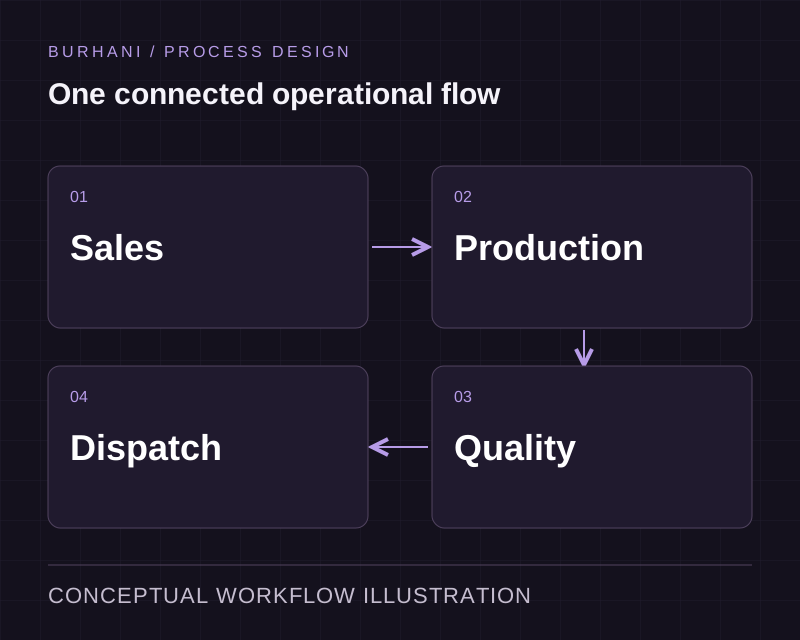
Enquiry to delivery in one flow
Sales enquiry, order, raw material, production scheduling, quality checks and dispatch, connected so a status change in one is visible in all of them.
Production monitoring dashboards
Live status on every active batch, so the office sees what the floor sees without asking. This is the piece most spreadsheets cannot do at all.
Stock and consumption analytics
Accurate stock positions, raw material consumption against plan, and reorder points that fire from real movement instead of a monthly review.
Customer and vendor records
One record per relationship, carrying orders, pricing history and correspondence, available to whoever picks up the call.
Reporting and KPI monitoring
The numbers your review meeting uses, generated from live data rather than assembled the night before.
Role-based access
Each role sees and edits only what it should. Defined during the mapping phase, not bolted on after go-live.
Start with records your team can reconcile
Choose a first module that has clear owners and dependable source records. Compare balances, permissions and status changes with the current process before extending the ERP to another department. Migration needs decisions about duplicate records, missing fields and the history users must retain.
System integration connects the ERP to software you keep. Agree which system owns each field and how failed or repeated transfers will be handled. A shared dashboard is useful only when the underlying records can be trusted.
Reduce the manual work between departments
An invoice may arrive as a document, become a finance record and then wait for approval. AI-enabled capture can help read the incoming information. Validation and approval rules determine what can proceed and what needs review. Business process automation brings those steps into the ERP workflow.
For production and inventory requirements, our manufacturing software work shows how shared records support scheduling, stock control and dispatch.
Choose the ERP approach that fits your operation
Compare the workflows and total implementation effort, including the systems and records you need to retain.
Departmental process
Assess the fit of standard modules and configuration.
Define modules around the agreed departmental sequence.
Existing systems
Check connector coverage and the cost of extensions.
Design the required integration alongside the ERP.
Rollout
Plan configuration, migration, training and cutover.
Plan the first module, reconciliation and wider rollout.
Ownership and maintenance
Review vendor terms, support and upgrade requirements.
Agree code handover, support responsibilities and future changes.
Extend your ERP around the work it supports
From process mapping to ERP rollout
Discovery
We walk your current workflow with the people who run it and record where work stalls, duplicates or waits.
Scope and quote
A fixed price and a dated plan, issued after discovery. Payment runs against milestones.
Design
Review the proposed workflow, interfaces and data requirements before implementation. The design work follows the scope of the project.
Build and review
Implement the agreed scope in short cycles, review the changes and test the behaviour with representative records and exceptions.
Integrate and release
Test the required connections, confirm acceptance with your team and release according to the agreed rollout plan.
Support
The team that built it handles updates, integrations and support calls after go-live.
Technologies we work with
Every tool here is one we have shipped with.
- React
- Angular
- Vue
- Node.js
- Python
- .NET
- Java
- Kotlin
- Swift
- React Native
- Flutter
- Microsoft Azure
- AWS
- Google Cloud
- Terraform
- Docker
- Kubernetes
- Power BI
- Tableau
- Predictive analytics
- REST
- GraphQL
- SOAP
- iPaaS
Animation is paused to match your motion preference.


















ERP Solution for a Global Apparel Company
- Sector
- Apparel Manufacturing & Distribution
- Client
- A global apparel manufacturer
- Engagement type
- Custom ERP implementation
- What we built
- A centralized ERP covering sales, stock, production scheduling, quality assurance and dispatch
Questions about ERP Implementation
How long does an ERP implementation take?
The schedule depends on modules, data migration, integrations and user acceptance. We agree a first release and dated rollout plan after discovery, including the dependencies each team needs to resolve.
Can you connect our ERP to Tally?
Yes. Tally, SAP, Salesforce and in-house systems are all systems we integrate with. Where accounting stays in Tally, we keep it there and sync the transactions rather than asking finance to relearn a new ledger during an already busy change.
Do we have to replace everything at once?
No. We deliver in stages, usually starting with the department where the pain is loudest and the data is cleanest. Each stage goes live on its own, which keeps the business running and gives you a decision point before the next module starts.
What happens to our existing data?
It gets mapped, cleaned and migrated during the build, and we agree the cleaning rules with you rather than applying our own. Historical records that cannot be reconciled are kept in a read-only archive rather than being quietly dropped.
Who trains our team?
We do, on the system your team will use, once it is running. Training happens against your real data and your real workflow, because a demo dataset teaches people a process they will never repeat once they are back on the floor.
What happens after go-live?
The team that built the system handles updates, integrations and support calls. There is a support retainer with an agreed response window, and the people answering already know the codebase because they wrote it.
Related Blog Posts
View All Blogs
What ERP Implementation Actually Involves, Week by Week
What ERP implementation actually involves rarely matches the marketing timeline. Independent data puts the real median closer to nine months.

The ERP Implementation Process, and Where Most Timelines Actually Slip
The ERP implementation process breaks down in two predictable places. Here's where timelines actually slip, and how to catch it before it happens.

Seven Reasons ERP Implementations Stall, and What Each One Looks Like Early
Challenges in implementing an ERP system rarely start as big failures. Here's what each of the seven early warning signs actually looks like.
Plan your first ERP module
Tell us which departments need a shared record and which systems you want to retain. We will work through the modules, migration and rollout with you.